
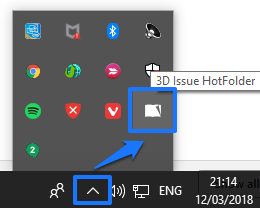
Navigate to the Queue Manager from your system tray as seen in the image below.
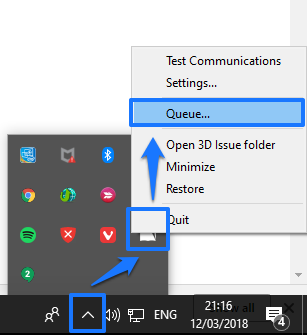
Right click on Live Tiles HotFolder and select Queue as seen in the image below. If there are any issues in your queue, select them and then click the x in the top right corner so that your queue is empty.
When this is done, close the application (Live Tiles Flipbooks) and then close the conversion plug-in (Live Tiles HotFolder) from the system tray (Right Click > Quit) if either of them are still running.
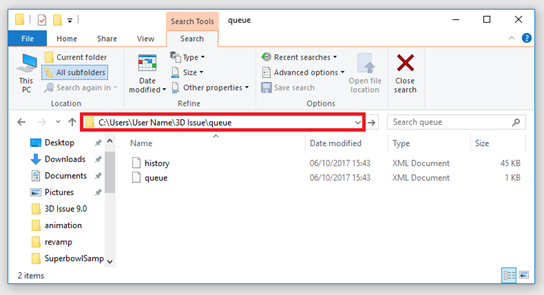
Open File Explorer on your PC and navigate here:
C:\Users\{Your User Name}\Live Tiles\queue
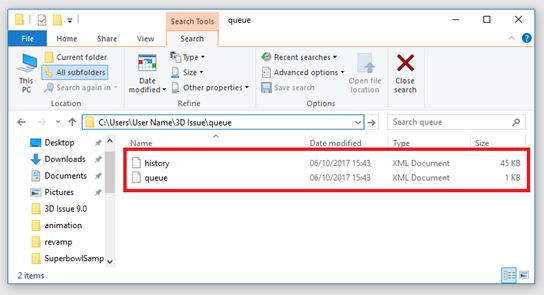
You should see two files history.xml and queue.xml as seen in the image below.
Delete both of these files from the queue folder.
Next, can you restart your machine again. Once restarted can you then open your magazine in the software and navigate to the output tab. Please click on edit under the upload panel and ensure that your upload settings are correct. Once you have re-specified the upload settings can you rebuild/upload your magazine online.
If the issue still persists could you please send support@3dissue.com screenshots of each of the windows in the upload settings so that they can check for any errors.